
 EN
How Do Ceramic Anilox Rollers and Chamber Doctor Blades Improve polythene bag printing machine Print Quality?
A small change in the ink film can turn clean lettering into a muddy edge or make a solid panel look uneven. On a polythene bag printing machine, the anilox roller and chamber doctor blade help control the ink that reaches the plate. They do not work alone: the film, ink, plate, drying and press settings all influence the finished bag.
For an operator, the useful question is not simply whether a polythene bag printing machine has these components. It is whether their condition and settings suit the artwork, the ink system and the PE film being run. The following checks connect each component to what can actually be observed on press.
How the ink reaches the film
In flexographic printing, the ink chamber supplies the engraved anilox surface. Tiny cells carry ink as the roller turns; a metering blade removes surplus ink from the surface while ink remains in the cells. The cells then transfer part of that ink to the raised image on the plate, which prints onto the moving film.
Upstream changes can show up as color variation or poorly defined details on a polythene bag printing machine. A 2021 study of anilox condition describes cell volume, screen and geometry as factors in ink transfer. It also notes the effect of cell clogging and wear. Assess the roller and blade together rather than treating either as an isolated upgrade.
What the ceramic anilox roller contributes
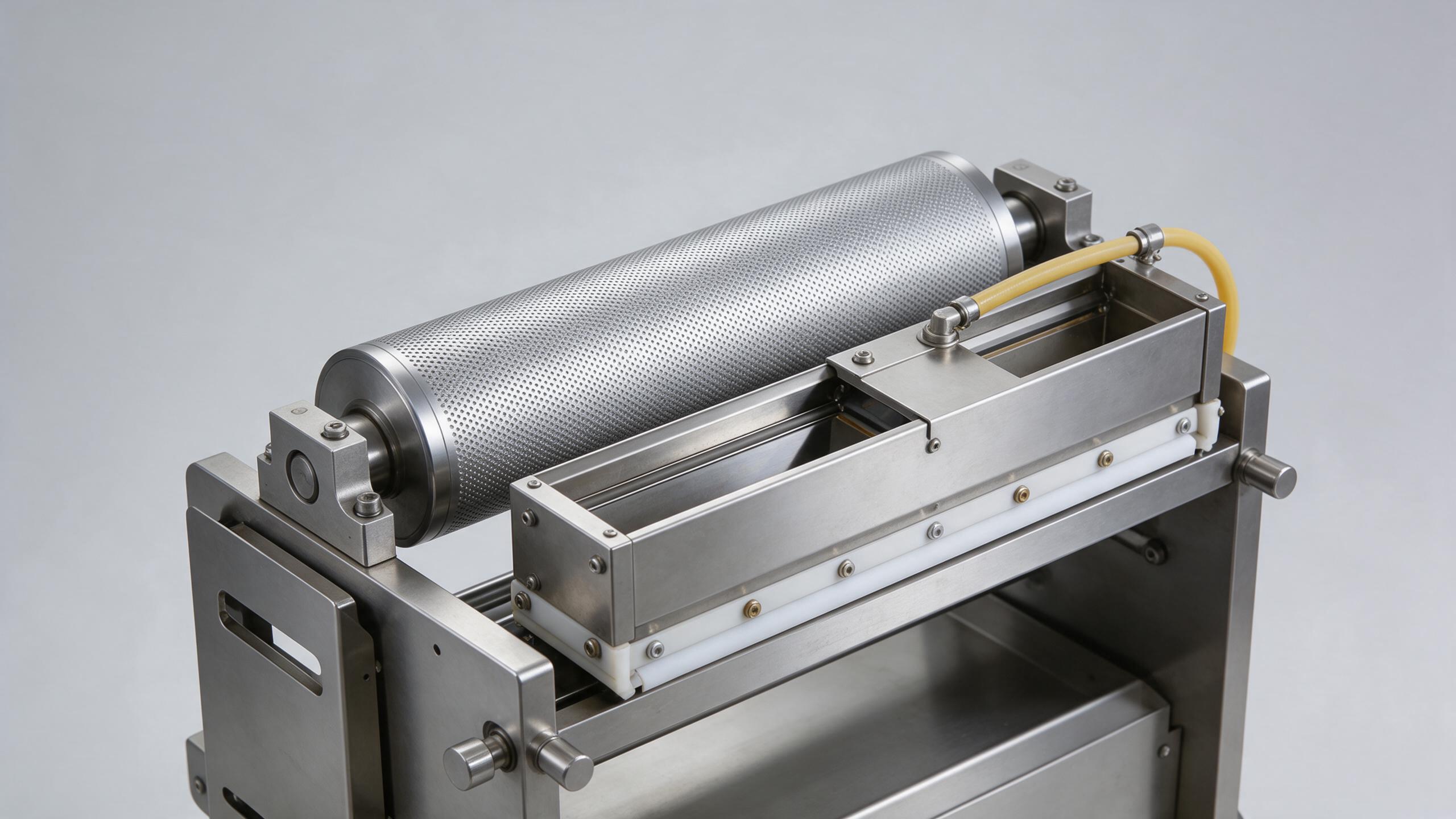
A ceramic-coated roller provides an engraved surface for metering. Its cell volume describes ink-carrying capacity; line screen and cell geometry also affect how ink is carried and released. For a polythene bag printing machine producing both fine type and dense solids, those needs may call for different roll specifications. A finer screen alone does not establish that a roller will suit every design.
When comparing a Ceramic Anilox polythene bag printing machine configuration, ask for the proposed roll's screen, volume and engraving details alongside the intended ink and plate. Review whether the same roll must print process artwork, broad solids or both. A trial on the actual film and artwork gives a more useful answer than a specification considered on its own.
Ink dried inside the cells reduces the available capacity. An operator may compensate with other adjustments, but this can obscure the original cause. On a polythene bag printing machine, inspect the roller using the supplier's recommended method, record its condition and use a compatible cleaning procedure. Do not use a blade or cleaning tool as an improvised scraper; follow the equipment and roller suppliers' safety and care instructions.
What the chamber doctor blade contributes
The chamber holds ink against the anilox and uses blades to contain and meter it. The working blade removes excess ink from the roller surface. If the contact is inconsistent, a polythene bag printing machine can show streaks, haze or variation across the printed width. Those symptoms have other possible causes, so check the blade edge, seating, chamber seals, ink condition and roller before changing several settings at once.
In a Chamber Doctor Blade PE Bag Flexo Printer setup, use the blade material, edge profile and settings specified for that chamber and ink. More pressure is not automatically better: excessive contact can increase wear or cause other problems. Follow the machine supplier's procedure for installation and pressure, stop and isolate the equipment before handling blades, and use appropriate protective equipment.
During a run, compare repeated defects with the position of the chamber and roller. If a streak remains in the same cross-web location, inspect for debris or an edge problem when it is safe to stop. On a polythene bag printing machine, note whether the mark returns after the blade is cleaned or replaced; that observation helps distinguish a recurring process issue from a single contaminated edge.
Why the two components must be matched
The roller determines the ink-carrying opportunity; the blade meters the ink left on its surface. If the cells are plugged, a fresh blade cannot restore their intended volume. If the blade does not wipe consistently, a sound roller cannot by itself deliver a stable ink film. On a polythene bag printing machine, ink viscosity and condition, chamber circulation and the plate also affect the result.
For example, suppose a design contains small reverse lettering next to a large solid. A polythene bag printing machine may need enough ink for the solid without filling the fine detail. Start with the film and ink supplier's guidance, check the chosen roller and plate, then compare a controlled sample. The example is illustrative, not a customer result; the correct combination depends on the actual job.
Do not diagnose every soft edge as an anilox problem. Excess plate impression, unsuitable ink, web movement or drying can produce similar symptoms. Change one variable at a time and keep an approved reference sample so that the team can compare color, detail and coverage under the same viewing conditions.
PE film and ink still set the boundaries
Polyethylene is a non-porous film, so surface condition and ink compatibility matter. On a polythene bag printing machine, an even metered ink film will not compensate for film that wets poorly or fails an agreed adhesion test. Check the treated side, storage conditions and the ink supplier's requirements before the production run.
One surface-treatment supplier describes an illustrative margin of about 10 dynes per centimeter between film surface energy and ink surface tension for wetting. This is guidance, not a universal acceptance limit. Confirm the test method and target with the film and ink suppliers, measure the actual substrate, and validate adhesion after printing under the conditions relevant to the bag's use.
Drying also deserves attention. An operator should check whether ink is dry enough for downstream handling without assuming that an appearance check alone proves adhesion. The polythene bag printing machine, the ink and the converting process should be assessed as one system, particularly when job speed or ink formulation changes.
A practical setup and troubleshooting checklist
- Define the job. Record the film type, treated side, ink system, artwork, required color and acceptance tests for the polythene bag printing machine.
- Inspect the roller. Verify the identification, engraving and cleanliness of the anilox; investigate damage or cell deposits with the supplier's recommended tools.
- Inspect the chamber. Check blade condition, seating and seals, then set contact according to the equipment instructions. Isolate the polythene bag printing machine before maintenance.
- Control the ink. Check the specified viscosity, mixing and filtration procedures. Record the measurement method and conditions rather than comparing unrelated readings.
- Run and compare. Print the actual artwork on the intended film. Check solids, fine type, streaks, registration and adhesion against the agreed sample; document adjustments.
If the result changes, use those records to narrow the cause. A Ceramic Anilox polythene bag printing machine may require cleaning or a different roll for a new job; a Chamber Doctor Blade PE Bag Flexo Printer may need a blade or seal inspection. Neither label alone confirms suitability for a particular application.
Questions to discuss before specifying the press
Ask the supplier which anilox and chamber options are available for the intended ink, how the roller will be cleaned and inspected, and what information is needed for a representative print trial. Clarify the scope of the polythene bag printing machine configuration and the acceptance criteria before comparing proposals. Wenzhou Qiangtuo Machinery works in flexographic printing equipment; discuss the film, artwork and workflow with the supplier rather than assuming any particular configuration is included.
Consistent print quality comes from a controlled process, not from one component in isolation. A well-matched roller and metering blade give the polythene bag printing machine a repeatable starting point; film treatment, ink selection, plate setup and routine checks determine how well that starting point carries through to the finished bag.
 Hot News